CarMate — AI-Powered In-Vehicle Companion
Overview
| Short Summary | CarMate is an AI-powered in-vehicle companion blueprint for Software Defined Vehicle (SDV) architectures. It enhances driver well-being, safety, and interaction by combining real-time vehicle data, conversational AI, and safe human-machine interfaces. |
| What is in the showcase | Real-time vehicle telemetry via VSS-aligned signals, Speech-to-Text (STT) and Text-to-Speech (TTS) processing, LLM-driven conversational AI, cluster display and Web UI, MCU hardware integration (optional) |
| SDV Projects Involved | Eclipse Kuksa, Eclipse Zenoh, Eclipse AutoWRX |
| Other Technologies | CARLA Simulator, COVESA VSS, Eclipse Mosquitto, Docker, Ollama |
| Target Hardware | Linux compute node (Docker host), Windows machine (CARLA simulator), Azure IoT Dev Kit / MCU node (optional) |
| Source Repository | eclipse-sdv-blueprints/carmate |
| Architecture Overview | 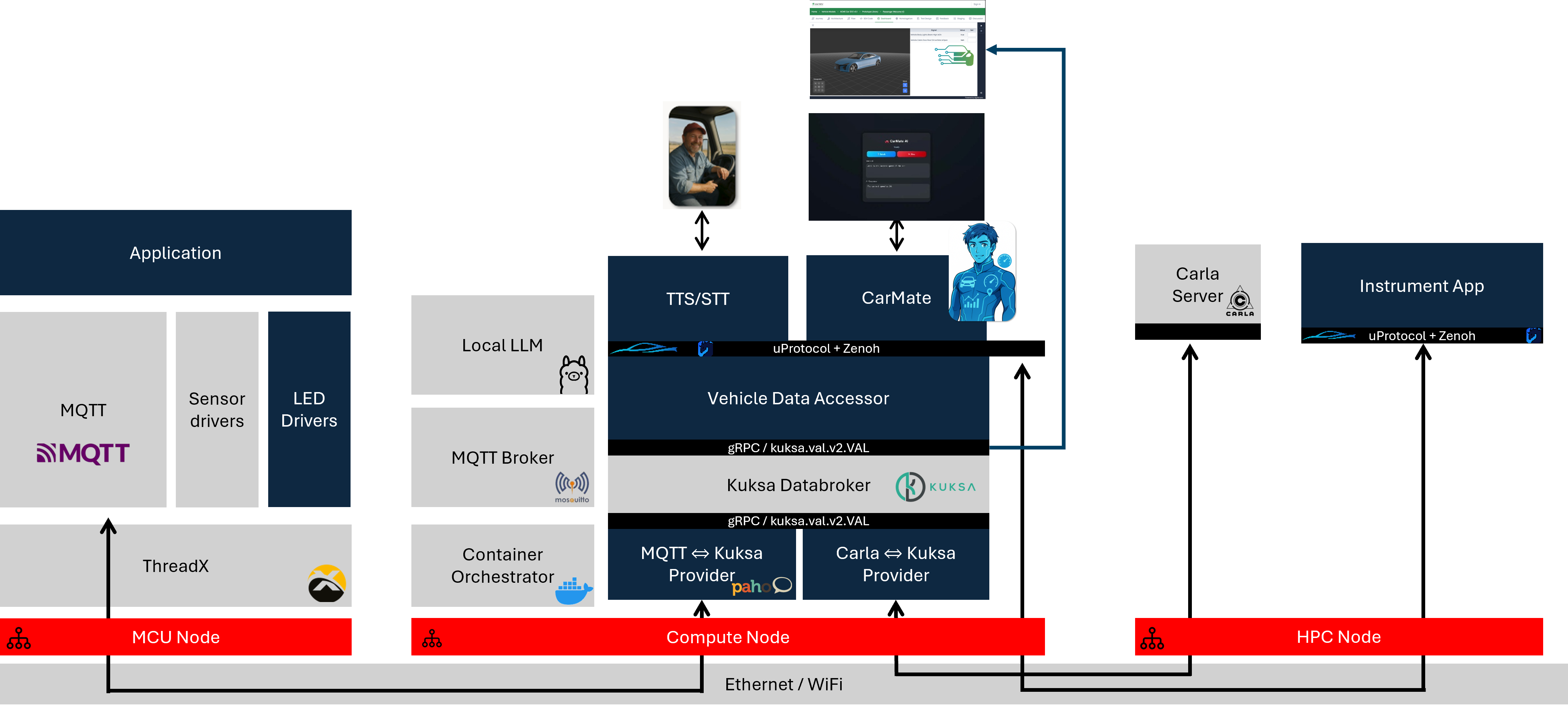 |
Blueprint Purpose
CarMate demonstrates an end-to-end SDV architecture for an AI-powered in-vehicle companion. It connects vehicle sensor data, simulation, and AI-driven conversational logic into a reproducible reference architecture built entirely from open-source SDV components.
The blueprint targets long-distance drivers, such as truck drivers and commuters, and addresses driver fatigue, loneliness, and situational awareness through intelligent, voice-driven in-vehicle interaction.
Key goals:
- Provide a reusable and extensible SDV blueprint based on open-source components
- Align all vehicle data with COVESA Vehicle Signal Specification (VSS) semantics
- Demonstrate bidirectional interaction between driver, AI, and vehicle systems
- Support both hardware-in-the-loop (CARLA + MCU) and fully simulated (mock) deployments
Use Cases
CarMate focuses on a driver companion scenario and supports the following interactions:
| Use Case | Description |
|---|---|
| Voice interaction | Captures driver voice input and converts it into structured commands via speech-to-text |
| Conversational AI | Enables the AI companion to respond socially, reducing driver loneliness |
| Vehicle context awareness | Maps telemetry (speed, altitude, temperature, humidity) into VSS signals for AI consumption |
| Environmental insights | Provides contextual driving information such as weather and road condition data |
| Vehicle control | Controls selected vehicle features such as ambient lighting based on AI decisions |
| Data visualization | Displays key vehicle data and AI-generated insights on the cluster display and Web UI |
| Bidirectional interaction | Supports full round-trips: driver input → AI reasoning → vehicle feedback |
SDV Technologies
The diagram below shows how the core Eclipse SDV components interact within CarMate:
Attribution
CarMate is built upon and evolved from the original hackathon project ArBytesMoral, developed during the Eclipse SDV Hackathon Chapter Three. The following foundational contributions are gratefully acknowledged:
- In-Vehicle AI Companion Concept — The original vision for an interactive, driver-focused AI companion designed to enhance well-being, mitigate driver fatigue, and manage in-cabin interactions.
- Initial Hardware & Simulation Pipeline — The end-to-end telemetry architecture connecting MCU sensor hardware, CARLA simulator environments, and Kuksa-based VSS signal processing.
- Core Agent Interaction Flow — The basic architecture for integrating STT, TTS, and LLM-driven conversational logic with vehicle signal loops.
Building upon that foundational work, this project introduced the following major updates:
- Containerization — Migrated from Podman to Docker
- Language migration — Rebuilt the core codebase from Rust to Python
- SDV runtime — Integrated Eclipse AutoWRX as a primary middleware layer
- Flexible LLM support — Added Ollama (local) alongside cloud-based models (OpenAI, Gemini, Grok, Groq)
- Enhanced visuals — Redesigned cluster display and Web UI
- Mock data fallback — Blueprint runs and can be evaluated without a CARLA server
Continue Reading
- Architecture — Detailed node breakdown, data flow, and component interaction
- Getting Started — Prerequisites, quick start, and step-by-step setup guide
- Components — Per-component reference for every service in the Docker Compose stack