README
ROS Racer Blueprint
An Eclipse SDV Blueprint for Multi-Agent ROS Racers



Table of Contents
- Overview
- Architecture
- Eclipse Muto Integration
- Key Scenarios
- Technology Stack
- Benefits Demonstrated
- Getting Started
- Learn More
- Constraints
- Contributing
- Support
- License and Copyright
Overview
The ROS Racer Blueprint is an Eclipse Software Defined Vehicle (SDV) demonstration that showcases how cloud-native orchestration and over-the-air (OTA) software delivery can be applied to autonomous racing vehicles. This blueprint brings together several Eclipse SDV technologies to create a realistic, multi-agent autonomous racing simulation that demonstrates the future of vehicle software management.
At its core, this project uses the F1TENTH autonomous racing platform combined with Eclipse Muto - an adaptive framework for dynamically composable, model-driven software stacks in ROS 2 environments. The blueprint demonstrates how multiple autonomous racecars can be orchestrated, updated, and managed in real-time through both direct ROS topic communication and cloud-based orchestration via Eclipse Symphony.
Key Capabilities
- Multi-Agent Simulation: Up to 20 autonomous racecars running independently with the F1TENTH gym environment
- OTA Software Updates: Zero-downtime deployment of new driving algorithms to running vehicles
- Automatic Rollback: Self-healing fleet that automatically reverts failed deployments
- Fleet Heterogeneity: Deploy different algorithms to individual vehicles based on role or conditions
- Dual Orchestration Modes:
- Direct ROS topic-based deployment (Muto native)
- Cloud-native orchestration via Eclipse Symphony
- Visual Feedback: Real-time RViz visualization accessible through web browser (noVNC)
Architecture
The ROS Racer Blueprint implements a sophisticated multi-layer architecture that separates simulation, edge compute, orchestration, and artifact management concerns.
High-Level Architecture Diagram
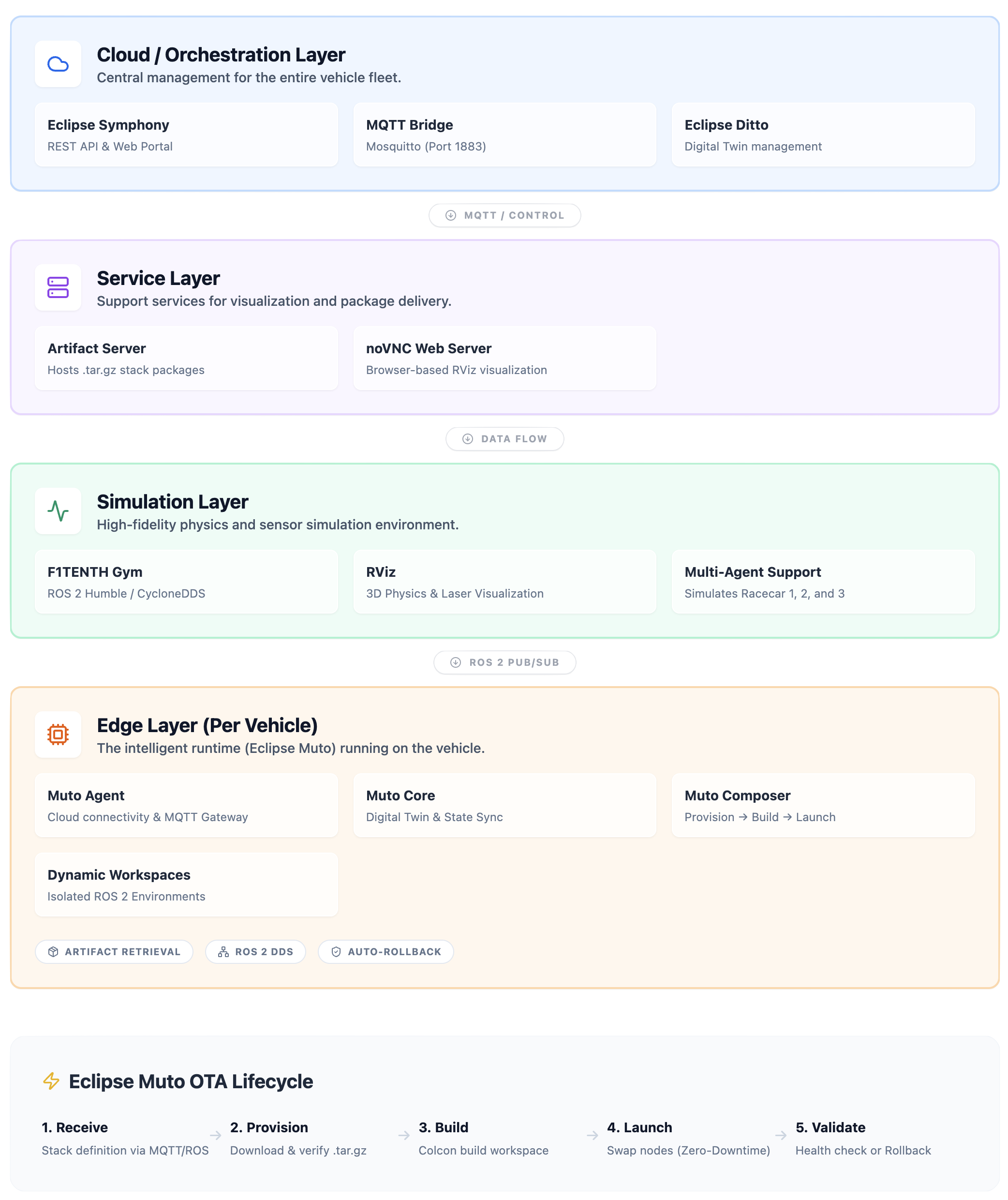
Component Details
1. Simulation Layer
The simulation layer is built on the F1TENTH Gym environment with ROS 2 integration:
F1TENTH Gym Simulator (
simcontainer)- Provides physics-based simulation of 1/10th scale autonomous racecars
- Battle-tested multi-agent scenarios with up to 20 vehicles
- Publishes sensor data (
/racecar*/scan,/racecar*/odom) where * is the racecar number - Subscribes to control commands (
/racecar*/drive) - Runs RViz for 3D visualization
- Uses CycloneDDS for ROS 2 middleware (low-latency, efficient)
noVNC Visualization
- Browser-accessible VNC server (no client installation required)
- Provides real-time view of RViz visualization
- Accessible at
http://localhost:8080/vnc.html - Displays all three vehicles on the Spielberg race track
2. Edge Layer - Eclipse Muto Stack
Each autonomous vehicle (racecar1, racecar2, racecar3) runs a complete Eclipse Muto stack in its own container. This represents the edge compute environment that would exist on a real vehicle.
Eclipse Muto Components
Muto Agent
- Handles cloud connectivity and external orchestration
- MQTT Gateway: Bidirectional bridge to cloud MQTT brokers (Eclipse Ditto, Symphony)
- Commands Plugin: Enables remote execution of ROS commands (topic list, node info, parameter get, etc.)
- Symphony Provider: Integration point for Eclipse Symphony orchestration
- Listens on vehicle-specific topics (e.g.,
/racecar1_muto/stack)
Muto Core
- Digital Twin: Maintains a synchronized representation of vehicle state
- Publishes vehicle attributes, status, and capabilities
- Integration with Eclipse Ditto for cloud-side digital twin management
Muto Composer
The heart of dynamic software composition and OTA updates
Main Composer: Orchestrates the full stack lifecycle
- Receives stack definitions via ROS topics or MQTT
- Coordinates provision → build → launch sequence
- Manages workspace states and transitions
- Implements automatic rollback on failure
Provision Plugin:
- Downloads stack packages from artifact server (HTTP)
- Validates checksums (SHA256)
- Extracts archives to workspace directories
- Manages
~/.muto/workspaces/{stack_name}/structure
Compose Plugin:
- Builds ROS 2 workspaces using
colcon build - Resolves dependencies via
rosdep - Creates isolated build environments per stack
- Builds ROS 2 workspaces using
Launch Plugin:
- Starts/stops ROS nodes based on stack launch files
- Monitors node health and lifecycle
- Implements graceful shutdown and cleanup
- Detects failures and triggers rollback
Dynamic Workspaces
- Each deployed stack creates a workspace under
~/.muto/workspaces/ - Workspaces are self-contained ROS 2 packages with:
- Source code (extracted from .tar.gz)
- Build artifacts (colcon build output)
- Launch scripts (e.g.,
run.sh) - Configuration files
- Multiple workspaces can coexist; Composer manages which is active
3. Service Layer
Artifact Server
- Simple Python HTTP server serving on port 9090
- Hosts stack packages as
.tar.gzarchives:gap_follower_conservative.tar.gzgap_follower_balanced.tar.gzgap_follower_aggressive.tar.gzgap_follower_broken.tar.gz(intentionally broken for rollback demo)
- Each package contains ROS 2 workspace with driving algorithm implementation
- Checksums in stack definitions ensure integrity
4. Cloud/Orchestration Layer (Optional)
Eclipse Symphony
- Cloud-native orchestration platform for edge deployments
- Symphony API: REST API for managing solutions, instances, targets
- Symphony Portal: Web dashboard for fleet visualization
- MQTT Bridge: Mosquitto broker connects Symphony to Muto agents
- Abstraction Model:
- Solutions: Versioned software packages (wraps Muto stacks)
- Targets: Represents edge devices (vehicles)
- Instances: Links solutions to targets, triggering deployment
Eclipse Muto Integration
Eclipse Muto is the cornerstone of this blueprint, providing the intelligent edge runtime that enables dynamic, cloud-native software management for ROS 2 systems.
What is Eclipse Muto?
Eclipse Muto is an adaptive framework and runtime platform for building dynamically composable, model-driven software stacks in ROS-based robotic systems. It brings cloud-native DevOps practices to the edge, enabling:
- Dynamic Composition: Load, build, and launch ROS packages at runtime without redeployment
- OTA Updates: Zero-downtime software updates via stack definitions
- Automatic Rollback: Self-healing behavior when deployments fail
- Digital Twin Integration: Synchronized cloud-side representation of edge devices
- Multi-Protocol Connectivity: Support for MQTT, HTTP, and ROS 2 DDS
- Model-Driven: Stack definitions as declarative JSON/YAML
Muto in the ROS Racer Blueprint
In this blueprint, Muto transforms traditional static ROS deployments into a dynamic, cloud-managed system:
1. Stack-Based Deployment Model
Instead of baking algorithms into container images, Muto uses stack definitions - lightweight JSON descriptors:
{
  "metadata": {
    "name": "gap_follower_balanced",
    "version": "1.1.0",
    "content_type": "stack/archive"
  },
  "launch": {
    "url": "http://artifact-server:9090/gap_follower_balanced.tar.gz",
    "properties": {
      "algorithm": "sha256",
      "checksum": "a1b2c3d4...",
      "launch_file": "run.sh",
      "flatten": true
    }
  }
}
This definition tells Muto:
- What to download (
url) - How to verify it (
checksum) - How to launch it (
launch_file) - Metadata for versioning and tracking
2. OTA Deployment Flow
When a stack is deployed, Muto executes this sequence:
1. Stack Definition Received (ROS topic or MQTT)
   └─> Composer validates and queues

2. Provisioning Phase
   └─> Provision Plugin downloads .tar.gz from artifact server
   └─> Validates SHA256 checksum
   └─> Extracts to ~/.muto/workspaces/{stack_name}/

3. Build Phase
   └─> Compose Plugin runs 'colcon build'
   └─> Resolves dependencies
   └─> Creates install/ directory with ROS 2 artifacts

4. Launch Phase
   └─> Launch Plugin stops previous stack (graceful shutdown)
   └─> Sources new workspace setup.bash
   └─> Executes launch_file (e.g., run.sh)
   └─> Monitors node health

5. Validation
   └─> If nodes crash or fail to start within timeout:
       └─> Automatic rollback to previous working stack
   └─> If successful:
       └─> New stack becomes active
       └─> Digital twin updated with new state
3. Zero-Downtime Updates
Muto achieves zero-downtime by:
- Building new workspaces alongside running ones (no interruption)
- Only switching to the new stack after successful build
- Gracefully terminating old nodes before starting new ones
- Maintaining state continuity through ROS 2 parameter persistence
4. Automatic Rollback
The gap_follower_broken stack demonstrates Muto's self-healing by intentionally deploying a broken algorithm:
5. Fleet Management
Muto's namespace-based architecture enables fleet-wide or targeted deployments:
Each vehicle independently:
- Receives stack on its /{vehicle_name}_muto/stack topic
- Executes full deployment pipeline
- Manages its own workspace state
- Reports status via digital twin
6. Digital Twin Synchronization
Muto Core maintains a digital twin for each vehicle:
- Attributes: Vehicle ID, capabilities, hardware specs
- State: Current stack, version, deployed workspaces
- Telemetry: CPU, memory, network status
- Events: Deployment history, rollback events, errors
This twin synchronizes with Eclipse Ditto (cloud-side digital twin platform), enabling:
- Fleet-wide visibility into deployment status
- Historical audit trail
- Conditional deployments based on vehicle state
- Integration with Symphony for orchestration
7. Multi-Protocol Gateway
Muto's MQTT Gateway bridges multiple communication domains:
Cloud (MQTT) ←→ Muto Agent ←→ ROS 2 (DDS)
                    ↕
              Digital Twin (Ditto)
                    ↕
           Symphony (Orchestration)
This enables:
- Remote command execution via MQTT
- Stack deployment from cloud or local ROS topics
- Telemetry streaming to cloud
- Symphony-based orchestration
Key Scenarios
Scenario 1: Initial Deployment
Deploy a conservative driving algorithm to all three vehicles for initial testing.
Scenario 2: Progressive OTA Updates
Incrementally increase performance: conservative → balanced → aggressive, demonstrating seamless transitions.
Scenario 3: Automatic Rollback
Deploy a broken algorithm and watch Muto automatically recover to the previous version.
Scenario 4: Heterogeneous Fleet
Assign different algorithms to vehicles based on their role (lead car = conservative, middle = aggressive, rear = balanced).
Scenario 5: Symphony Orchestration
Use Eclipse Symphony's REST API to manage deployments at scale, demonstrating cloud-native fleet management.
Technology Stack
- ROS 2 Humble: Robot Operating System for autonomous vehicle software
- Eclipse Muto: Adaptive framework for dynamic ROS stack composition
- Eclipse Symphony: Cloud-native orchestration platform (optional)
- Eclipse Ditto: Digital twin platform for IoT/edge devices
- F1TENTH Gym: High-fidelity autonomous racing simulator
- CycloneDDS: High-performance DDS implementation for ROS 2
- Python 3.11: Stack deployment scripts and HTTP server
- Docker/Podman: Container runtime for edge and simulation environments
- MQTT (Mosquitto): Lightweight messaging for cloud-edge communication
- noVNC: Browser-based VNC for accessible visualization
Benefits Demonstrated
- Agility: Deploy new algorithms in minutes, not hours
- Safety: Automatic rollback prevents fleet-wide failures
- Flexibility: Mix different algorithms across fleet for optimal performance
- Observability: Real-time state via digital twins
- Cloud-Native: Standards-based orchestration (Symphony, MQTT, ROS 2)
- Developer Productivity: Test locally, deploy identically to edge
- Zero-Downtime: Seamless transitions between software versions
Getting Started
For detailed instructions, see Quickstart and demo/README.md.
Quick Start: Scaling to 20 Racecars
The system supports scaling from 3 up to 20 racecars with configurable ROS middleware.
Configuration Options
| Variable | Default | Options | Description |
|---|---|---|---|
NUM_AGENTS | 3 | 1-20 | Number of racecars to spawn |
DEPLOY_STAGGER | 0.5 | 0.0-2.0 | Delay between vehicle deployments (seconds) |
Basic Usage
# Default: 3 cars
python3 scripts/generate-compose.py > docker-compose.yml
docker compose up --build

# Scale to 10 cars
NUM_AGENTS=10 python3 scripts/generate-compose.py > docker-compose.yml
docker compose up --build

# Scale to 20 cars
NUM_AGENTS=20 python3 scripts/generate-compose.py > docker-compose.yml
docker compose up --build
Deploy with Varied Driving Styles
Generate per-vehicle stacks with cycling driving styles (aggressive → balanced → conservative):
# Generate stack files for all vehicles
NUM_AGENTS=20 python3 scripts/generate-gap-follower-stacks.py

# Deploy to all vehicles with staggered timing
NUM_AGENTS=20 python3 demo/scripts/deploy-stack-fleet.py
Resource Requirements (20 agents)
| Component | CPU | Memory |
|---|---|---|
| sim | 8.0 | 5GB |
| edge (×20) | 0.5 each | 512MB each |
| Total | ~18 cores | ~15GB |
Note: Sim resources scale automatically (2 + 0.3 per agent CPUs, 2GB + 150MB per agent).
Learn More
- Eclipse Muto: https://github.com/eclipse-muto/muto
- Eclipse SDV: https://sdv.eclipse.org/
- F1TENTH: https://f1tenth.org/
- Eclipse Symphony: https://github.com/eclipse-symphony/symphony
- Eclipse Ditto: https://www.eclipse.org/ditto/
Constraints
- Initial Racecar & Lap spawn points: They are hardcoded according to
example_map. When you change the map, it will fumble, you'd have to readjust the default spawning points.
Contributing
Contributions are welcome! Please read our contributing guidelines and submit pull requests to the GitHub repository.
Support
License and Copyright
This project is licensed under the Eclipse Public License 2.0. See LICENSE for details.
Portions derived from f1tenth_gym_ros are licensed under the MIT License.